Level up your Construction,Drywall,Survey,Event,Flooring,Electrical,Roofing,Masonry,Carpentry,Painting,Glazing,Plumbing,Fire Protection,Landscaping,Insulation,Remodeling,Low Voltage,Window Crew Forecasting and Scheduling
Trade the spreadsheet and whiteboard for a better view. Plan your projects, lead your crew.
CrewSnap is construction resource scheduling built by construction for construction companies, subcontractors, and trade partners. Efficiently manage crews across multiple projects, forecast resource needs visually, and optimize cash flow planning. Gain clarity, precision, and control over your scheduling.
About CrewSnap
Fast, Powerful, Efficient
Forecast crew requirements for current and future projects, and assign employees and crews.

Projects
Trades
Crews
Employees
- Track active and Projected Projects
- Easily time-shift project starts without re-working forecasts.
- Track certifications with expiration dates
Up and Running in Minutes, not Months
We know that crew scheduling is an important job, but not your most important job. CrewSnap is designed to be intuitive and fast.

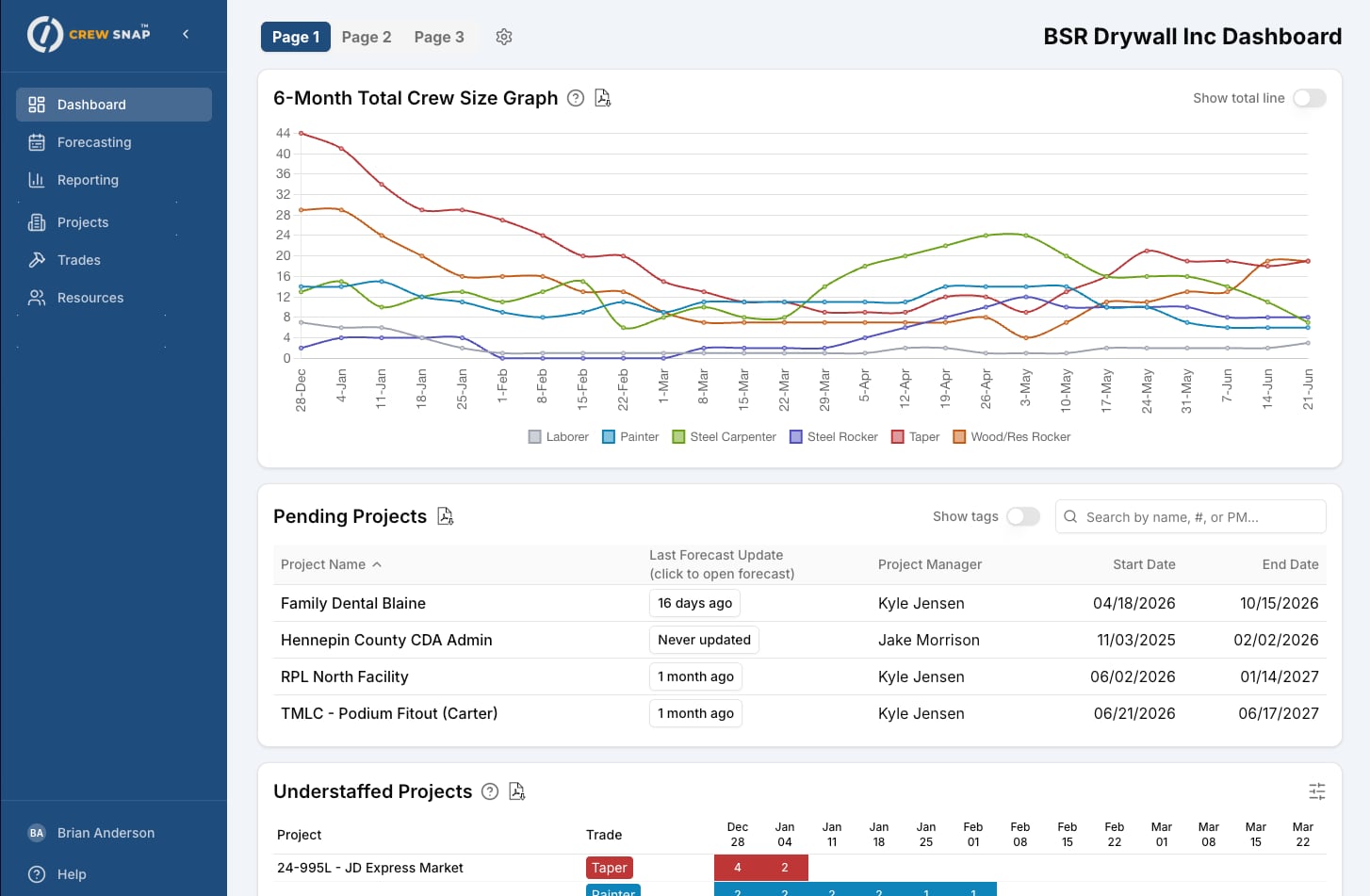
Customize your Dashboard
Every user can customize their dashboard with the data that is important to them.
Build and use Crews
Use optional Crews to keep selected employees together.
Schedule Equipment
Schedule equipment alongside your employees and crews.
Organize your way with Tags
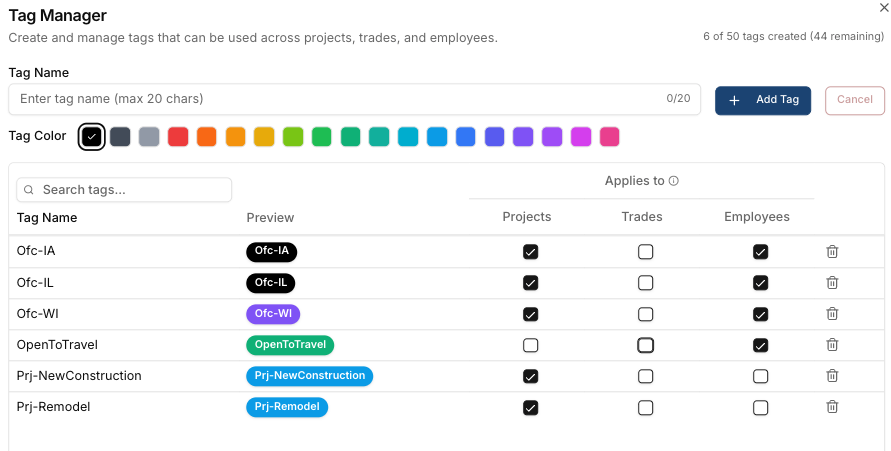
Crewsnap’s flexible and powerful tag system allows you to organize projects, employees, and trades to match your company’s structure.
Organize your workforce data with flexible, color-coded tags.
Tag What Matters
Create tags for any combination of:
- Projects – by region, office, client, or type (e.g., “Commercial,” “Government”)
- Employees/Resources – by certification, status, region or any other data. Examples: “OSHA 30,” “Lead Qualified”, “Travel”. Optionally track expiration dates and numbers for certifications.
- Trades – by category (e.g., “Structural,” “MEP”)
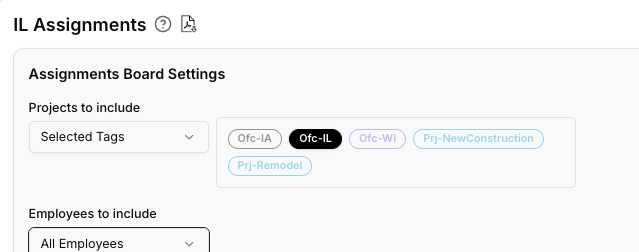
Filter Smarter
Tags power filtering across CrewSnap:
- Reports – Generate reports for specific tagged projects or resources
- Dashboards – Focus views on what matters right now
Easy to Manage
Access Tag Manager from Settings to create, edit, or delete tags. Choose from 19 colors for instant visual recognition. Up to 50 tags per company, 20 characters max. Delete a tag and it’s removed everywhere automatically.
Features
Feature Rich
CrewSnap offers an extensive and constantly expanding suite of workforce management features designed to streamline construction scheduling and crew coordination.
– Interactive grid-based forecasting by project and trade
– Daily or weekly planning granularity
– Real-time crew requirements entry
– Assign specific resources to project positions
– Customizable 3-page dashboard
– Crew size forecast graphs
– Active and pending project lists
– Assignments board (daily/weekly view)
– Understaffed projects alerts
– Overallocated resources warnings
– Unassigned/available resource visibility
– More added frequently
– Use Crewsnap’s powerful tagging system to organize projects, employees, and equipment by location or office.
– Create custom dashboards and reports based on office or location
– Full project lifecycle (Pending → Active → Archived)
– Job details: number, address, client, contacts
– Assign superintendent, foreman, project manager
– Define required trades per project
– Project-level access control for team members
– Assign availability dates and default trade to employees.
– Import/Export employees with Excel files.
– Track other information like employee ID, notes.
– Track certifications using tags, with optional expiration dates and numbers.
– Organize resources into crews
– Track active and inactive resources
– Assignment conflict detection
– Equipment can be tracked as a type of resource, similar to employees.
– Forecast equipment requirements by day/week/project, assign equipment to projects.
– Import/Export with Excel files.
– Color-coded tags for projects, resources, and trades
– Filter reports and dashboards by tags
– Up to 50 custom tags per company
– Create, save, and name your own reports.
– Export to PDF and Excel
– Share reports with other team members.
– Role-based access: Owner, Admin, Manager, User
– Invite team members
– Project-level access restrictions for users
– Customize terminology (Resource, Employee, Crew Member, etc.)
– Configure daily lookahead window
– Weekly or daily default view
Pricing
Clear, Up-front Pricing. 14 days Free.
No per-user pricing, no “annual revenue” pricing. Select a plan that meets your needs, switch plans any time. Save 2 months’ cost when you pay annually. Want to try for free for 14 days? Start with the Timber Monthly plan.
We don’t charge per user – all plans include a generous allowance for users, and all features.
Timber - Annual Payment
US
$75
/month
- Up to 8 active and projected projects.
- No per-user cost.
Concrete - Annual Payment
US
$150
/month
- Up to 25 active and projected projects.
- No per-user cost.
Steel - Annual Payment
US
$350
/month
- Up to 100 active and projected projects.
- No per-user cost.
Timber - Monthly Payment
Free for 14 days, then
US
$90
/month
- Up to 8 active and projected projects.
- No per-user cost.
- Upgrade any time
Concrete - Monthly Payment
US
$180
/month
- Up to 25 active and projected projects.
- No per-user cost.
Steel - Monthly Payment
US
$420
/month
- Up to 100 active and projected projects.
- No per-user cost.
Testimonials
Hear from our users

“I sent the login info to my project managers on a Monday morning. By lunch, they were already forecasting projects. Nobody called me with questions. Nobody needed a tutorial. They just opened it up and started using it.
Frequently asked questions
What is CrewSnap?
CrewSnap is construction resource scheduling software built specifically for construction companies, subcontractors, and trade partners. It helps you efficiently manage crews across multiple projects, forecast resource needs visually, and optimize your workforce planning with clarity and precision.
What are Trades in CrewSnap?
Trades are “job roles”. You add trades to a project, and define how many of each trade you need every day/week of the project.
What time scale does CrewSnap use?
Forecasting in CrewSnap is done at the weekly level for long-term planning. You can switch to daily mode for short-term planning and crew assignments.
What happens when my project dates change?
When a project start date changes, you can just change the start date, and the system will automatically adjust forecasts and crew assignments.
What industries is CrewSnap designed for?
CrewSnap is designed for any business that needs to forecast employee staff levels and equipment for current and upcoming projects. This is a natural fit for construction trades, but can also be used for other project-based industries, like event management and civil engineering.
How far in the future can I forecast with CrewSnap?
CrewSnap can be used to forecast projects for as short as the current week, and as long as 5+ years.