Tell the crew where to go, automatically
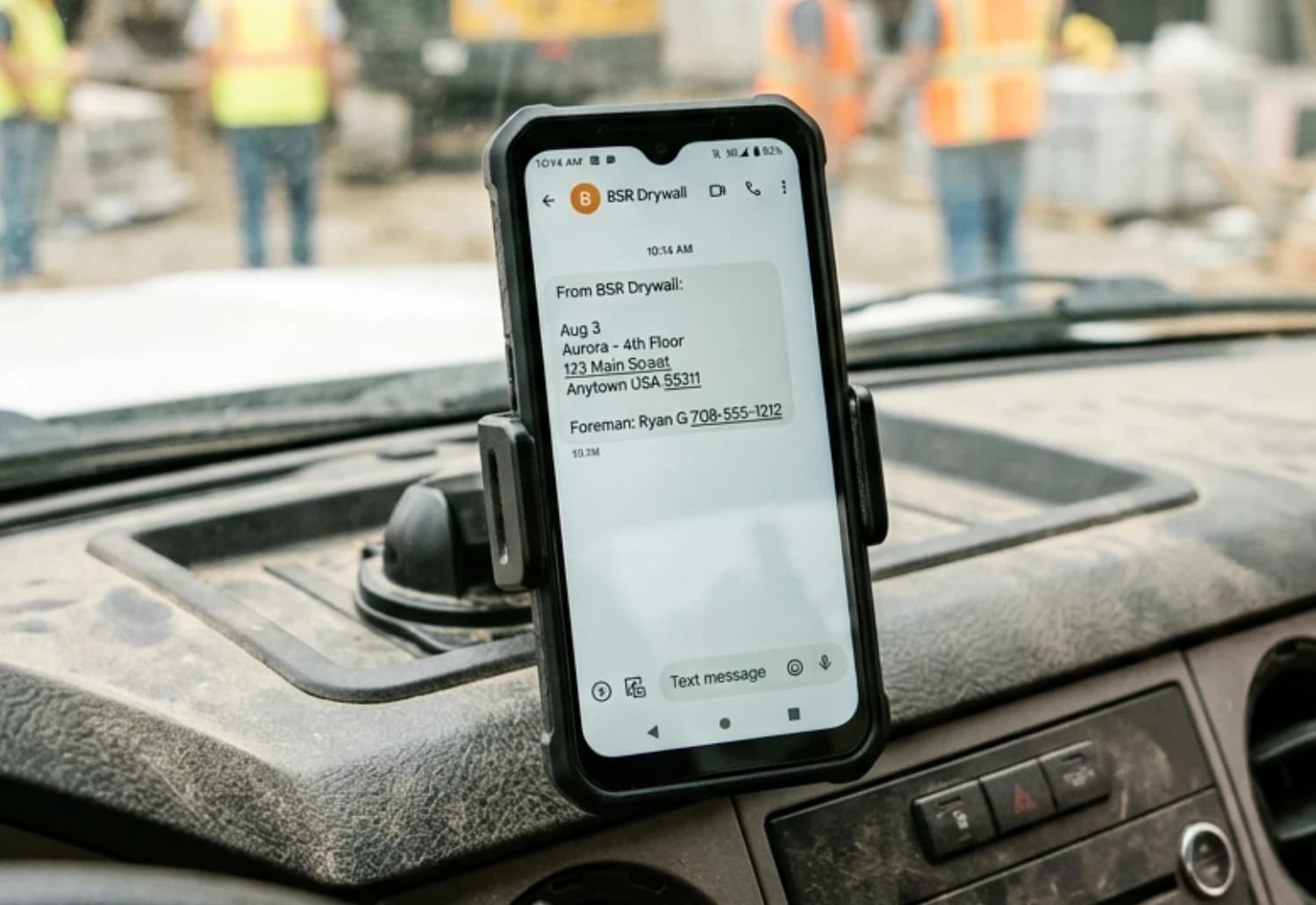
CrewSnap texts or emails every employee their next-day assignment: the job, the address, and the site contact. It runs every day off the schedule you already built, so nobody makes the morning round of calls and nobody has a second place to keep current.
Those calls have a price. What calling your crews every day actually costs, worked out from real wage data.
One message, the three things that matter
Each person gets their own assignment rather than a broadcast they have to read themselves into.
- Where they are working next
- The site address
- Who to find when they get there
A manager can add a note to the day's send, or hold it when tomorrow is still moving.
The schedule is the source, not a second list
Messaging tools send what someone types into them. That works until the schedule changes at 4pm and the message went out at 3pm. Because CrewSnap sends from the scheduling board itself, the assignment people receive is the assignment that exists, and there is no separate list to remember to update.
That board is itself downstream of the forecast: a crew requirement is recorded against a project before anyone is assigned to it, and the assignment that eventually goes out by text is the one that filled that position. Where assignments come from.
STOP and HELP, handled
Anyone can reply STOP to any message to stop receiving them. Replying HELP returns assistance information. Both keywords are registered with the carriers.
Employees provide a mobile number during setup and acknowledge a test message. The full terms, including how mobile information is handled, are in the SMS Privacy Policy.
Worth checking before you buy any tool that texts your crew: carriers require registered opt-out handling, and it is your business that carries the consequence if a vendor has not done it.
Common questions
Do I have to press send every day?
No. That is the main difference between this and a messaging tool. CrewSnap sends each employee their next-day assignment automatically from the schedule you already built, every day, without anyone remembering to do it.
What does the crew actually receive?
Where they are working next, the site address, and the site contact. A manager can add a custom note to a send, or hold a message when plans are still moving.
Text or email?
Either. Delivery is by SMS or email, so it works for crews who prefer one over the other.
How do people opt out?
By replying STOP to any message. Replying HELP returns assistance information. Both keywords are registered with the carriers. Full details are in the SMS privacy policy.
How is this different from a group chat or an SMS blast tool?
A group chat holds a conversation and an SMS tool sends what you type. Neither knows the schedule. CrewSnap sends each person their own assignment because it is reading the same forecast and the same board the assignment came from, so there is no second place to keep current.
Stop making the morning calls.
Start a 30-day trial. No card, no calls, no setup fee.